Selasa, 23 November 2010

MSI GX600-08 with Turbo battery Technology

MSI GX600-08 Laptop
MSI GX600-08 is the premiere notebook in the world with MSI's exclusive Turbo Battery Technology. When MSI GX600-08 is operating on Turbo Battery Mode, the MSI Turbo Battery Technology will automatically follow the processor, adjusting the programs that are being used, and either stop or lower the parts not being that are not currently running. The electricity will be fairly distributed the PC port and other USB interfaces as such to achieve the goal of saving energy while not effecting operate. Thus extending the battery operating time, so running on your battery power is no longer a compunctious experience.

While the MSI GX600-08 is in AC Mode, just press the turbo button above the keyboard, MSIs exclusive Turbo Drive Engine Technology can simultaneously increase the speed of the CPU and the system up to 20%. Your computer can run smoothly to the very best of its abilities.

Press Release:
MSI today announces a new model to its line of notebook, the GX600-08.

MSI GX600-08 is the premiere notebook in the world with MSI's exclusive Turbo Battery Technology. When MSI GX600-08 is operating on Turbo Battery Mode, the MSI Turbo Battery Technology will automatically follow the processor, adjusting the programs that are being used, and either stop or lower the parts not being that are not currently running. The electricity will be fairly distributed the PC port and other USB interfaces as such to achieve the goal of saving energy while not effecting operate. Thus extending the battery operating time, so running on your battery power is no longer a compunctious experience. In the other side, while the GX600-08 is in AC Mode, just press the turbo button above the keyboard, MSIs exclusive Turbo Drive Engine Technology can simultaneously increase the speed of the CPU and the system up to 20%. Your computer can run smoothly to the very best of its abilities.
*The test result differs under different testing environment

GX600-08's racer-class 3D speaker aperture was designed with the sport cars concept of the air intake system for a special visual variation, and by applying the metal's reflections as well as micro processing, the speakers are presented with an aerodynamic styling. Adding it with the sliver Turbo button, the simplistic design only amplified the superiority of the GX600-08.

GX600-08's eye-catching flame-like graphic design gives it a high degree of absolute presence which can be hardly ignored. While it is simplistic, it demands your attention, hence the uniqueness and class of the GX60008’. In addition, keeping the gamers' playing habits in mind, GX600-08 especially added the colorful W/A/S/D buttons on the keyboard, so the player can find the direction controls in record time. Every second counts when it comes to transitions in games! Keep the edge in the fast paced world of intense gaming competition.

Provided with the enormous 15.4" LCD monitor for your viewing pleasure, achieve the ultimate realism experience whether you are playing games or watching a DVD.

Equipped with the best NVIDIA Geforce 8600M GT 3D graphic card (Build-in 512 VRAM) and exclusive MSI vivid image enhancement technology can create the most astonishingly realistic audio and visual effects. With Digital/Analog 5.1 Channel headphone output and built-in SPDIF connection, the GX60008’ presents rich sound effects ideal for multimedia applications.

Recognized and approved by the highest standards of Dolby®, the GX60008’ guarantees to enable the enthusiasts to experience the thrill and excitement of movies, music, games, and TV in stunning surround sound.

Moreover, The GX600-08 features the latest Intel® Centrino® Duo Mobile Technology, which uses Intel® Core™2 Duo processor and Intel® PM965 Express Chipset, to deliver truly outstanding dual-core performance computing power, great battery life, and expanded wireless connectivity. So, GX600-08 can provide the freedom and flexibility to enjoy the game on the go.

Other multimedia applications include: the latest E- SATA support, high-definition multimedia interface, 1.3 mega pixels web cam for better internet chatting, DTV receiver (optional) so you can watch television shows on demand. All these to help you with a total relaxed environment so you can regroup again for the challenges ahead. Furthermore, wireless functions for easy internet connections anywhere and anytime

BenQ Joybook A53

BenQ Joybook A53 Laptop
BenQ announced the launch of its latest notebook PC, the Joybook A53 on Wednesday. It is the fourth laptop in the company's A-series range, sitting at the top as its flagship. The 15.4-inch Joybook sports a 2GHz Core 2 Duo processor and BenQ is pushing the A53's "metropolitan aesthetic" visible in the etched, brushed-metal finish. Other specifications include Windows Vista certification and an optional 8x dual-layer DVD writer.

The sharp-looking laptop also boasts a numeric keypad that pushes the imprinted touch-pad off-center -- with keys that are 20 percent larger and with greater spacing between them than standard desktops -- for greater ergonomics and ease of use. The large LCD features BenQ’s proprietary UltraVivid technology and DBEF coating that enhance picture quality, and the response time is a fast 8 milliseconds, on par with HDTVs. A 0.3-megapixel camera is built-in above the LCD screen.
BenQ Joybook A53
Buyers get a 5400rpm SATA hard drive, in a choice of four capacities ranging from 80 to 200GB, while standard memory comes at 512MB but is upgradeable to 2 GB. The Joybook’s seeming downside is the battery life, rated at an approximate 2.3 hours by BenQ.

The A53 is already available in Poland, Russia, China, Thailand and Australia, with more countries getting the new notebook soon. Pricing has not been announced.

Samsung Galaxy Tab review

The Samsung Galaxy Tab: iPad’s first real challenger
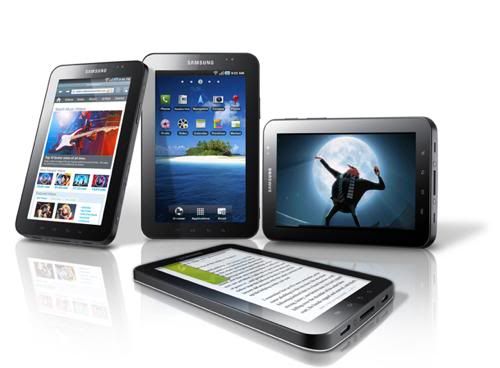
The Samsung Galaxy Tab has attracted a lot of attention as the first serious challenger to the Apple iPad. Running the current version of Android (2.2 or Froyo), the 7-inch plastic-encased tablet is notably smaller than the iPad but that also means it’s a comfortable fit for one-handed operation, or a rear jeans pocket, and at 380g it’s roughly half the weight of the iPad.
Physical buttons control power and volume, and aside from the usual four Android softkeys, the rest of your interaction is touchscreen based,  Haptic feedback feels positive and reassuring, and responsive to pinch gestures, taps and swipes.
The 1024×600 screen is bright and sharp, and interpolated HD video playback is surprisingly smooth and watchable thanks to the 1Ghz processor, even within the confines of the smaller screen. Samsung is betting that video will be a big selling point and thus there’s a dedicated Samsung Movies app – or browser shortcut, if you prefer – to video download service AceTrax. A currently US-only video on demand service is set to launch early next year, according to Samsung.
There’s plenty of storage for all that video too, with 16 or 32GB of onboard memory, and an expansion slot for another potential 32GB MicroSD.

Samsung Galaxy Tab: Music and browser
Music playback comes courtesy of the Samsung Music hub (and accompanying 7digital deal) which features an iTunes-like music store and a player. The store offers a medley of download options including Top 10s and album previews, and has a credible range of tunes for all tastes. The player is compatible with non-downloaded tunes too, so your existing music collection can be incorporated as well. Samsung’s decision to bundle a player is a wise one, as the standard Android player is basic at best, and even refused to play in the background on this test model – a problem Samsung assures us is a one-off.
A standard-size SIM – hear that Apple? – tees up voice/text and 3G. Hands-free voice quality isn’t bad, but even more so than the oversized Dell Streak, it’s really hard to see who’ll actually use it for voice calls. A Bluetooth headset is essential to avoid inevitable Dom Joly comparisons.
The supplied virtual keyboard is adequate, but a swift Android Market download later – we chose the Smart Keyboard – things were much improved and we were rattling emails at speed.
The stock browser is swift and renders sites competently enough – Flash is also included thanks to Froyo, and this really boosts the experience. Pinch-to-zoom or double-tap resizes pages swiftly and accurately, although cracks begin to show when presented with very densely-linked news sites. As with all Androids though, a new browser from the market is recommended to really open up the possibilities of a larger screen. Dolphin HD in particular makes the 7-in web really sparkle, with tabbed browsing and customisable gesture controls.
Samsung Galaxy Tab: Camera and Readers Hub
The rear-facing 3-meg camera grabs a decent snap in daylight, but an over-enthusiastic LED flash floods close subjects at night. A front-facing 1.3-meg cam should make video calls a snap but as it stands, Skype doesn’t support video calls on Android; it’s voice only.  But you can download Tango or use Fring.
The Samsung Readers Hub fronts up the Kobo ebooks app, with newspapers and magazines “coming soon” via Zinio. A simple registration gets you access to an Amazon-style digital bookstore with a huge range of free titles as well – it’s an entirely solid and user-friendly offering. The ereader functionality is basic, but generally works well.
The hardware is, despite a slightly cheap, plasticky feel, excellent. The Galaxy Tab really sets the bar high for other manufacturers.
However, the Android OS, though very good, is not optimised for tablets. It’s built for phones and it’s hard to get away from the sensation that this is an oversized handset – even the power-down splash screen refers to “your phone”.
High operator contract prices at launch will only increase this feeling. Cost is very much where the Tab will stand or fall – pre-order prices are set at £529 SIM free, and CarphoneWarehouse plans to charge £499.99 with a Talkmobile 30 £10 per month rolling contract. Considering the £529 + similar operator deals of the established iPad, this squeezes the potential market for the Tab pretty hard.
The problem extends to apps as well – a vital area if you’re taking on Apple. Most we tried upscaled perfectly well but there’s still the occasional optimisation glitch where landscape switches back to portrait for settings, grey bands appear under the Spotify player, or Skype’s splash screen is two inches shy of the screen borders. With the range of other Android tabs incoming, hopefully this will be only a temporary setback.
Overall though, the Galaxy Tab is the best non-Apple tablet to date, and it plays well against Apple’s impressive iPad. As the Android OS and app developers catch up with the new form factor, the gap is certain to narrow further.
The Samsung Galaxy Tab launch date is November 1st

Apple makes Find My iPhone free for all iOS 4.2 users

As a part of Monday's release of iOS 4.2, Apple will make the "Find My iPhone" set of remote-control features previously found in its $99-per-year MobileMe service available for free to owners of all iOS devices capable of running iOS 4.2.

Once users upgrade their iPads, iPhones, or iPod touches to iOS 4.2, they can enable the feature by opening the Settings app, tapping on "Mail, Contacts, Calendars," and then tapping Add Account. From the next menu, tap on MobileMe. The new MobileMe account prompt allows you to enter a MobileMe user name or your Apple ID--in other words, the same user name and password you use to buy media or apps via iTunes. There's also an option to create an Apple ID right from within the app.

Once Apple's system verifies your ID, you'll be able to turn on the Find My iPhone (or iPad, or iPod touch) feature.

How it works

Like the name says, this feature allows you to find your iOS device when you've lost it. To access the Find My iPhone set of features, users can log into Apple's MobileMe site at www.me.com or use the Find My iPhone iOS app. An iOS device can use two different methods to determine its location. The iPhone and 3G iPad come with a GPS receiver, so they can triangulate their location using satellite technology.

Wi-Fi-only devices use a less precise (but still quite effective) system that uses nearby Wi-Fi base stations to figure out their location. The downside of this approach is that if your device isn't on a Wi-Fi network, it can't look up its location or relay it back to you. So if you leave your iPod touch under your desk at work you're covered, but if you drop it in a field in the middle of a hike, forget it.

What it does

Though Find My iPhone does indeed let you view the location of all your iOS devices on a map--my wife uses this to figure out where I am and when I'm coming home for dinner, which is why we call it "Find My Husband"--it's not the only thing the feature can do.

If you lose your iOS device but just know it's around somewhere you can use Find My iPhone to make it play a sound, even if it's been set to operate silently. You can also make it display a message, which can be useful if you're trying to ask whomever found your lost device to give you a call and return it to you.

Two other features of Find My iPhone allow you to secure the device when it's out of your hands. Remote Lock lets you add a lock code to your device remotely, so that whomever has it can't unlock it and see your data. And Remote Wipe will irrevocably delete all your data.

What it doesn't do

Despite this feature being free, all the other features of Apple's MobileMe subscription service remain available only to those who pay the $99--or sometimes smaller--annual fee.

Teleskop Terbesar di Dunia


Hawaii telah terpilih sebagai tempat dibangunnya teleskop raksasa di dunia. Teleskop ini nantinya akan menjadi perangkat tercanggih yang membantu para ilmuwan untuk mempelajari lebih dalam tentang alam jagat ini.

Besarnya ukuran teleskop ini mampu menandingi teleskop berukuran besar yang pernah ada sebelumya. Kaca teleskopnya saja memiliki diameter berukuran hampir 100 kaki, atau kira-kira sama dengan panjang sayap pesawat Boeing 737.

Teleskop ini memiliki kemampuan mengumpulkan cahaya yang akan setara dengan 13 juta tahun berpergian keliling Bumi.

Ini artinya, para ahli astronomi yang melihat dengan teleskop tersebut akan bisa melihat citra pembentukan awal galaksi dan bintang yang terjadi 400 juta tahun setelah fenomena Big Bang.

"Perangkat ini akan sangat membantu kita mengetahui sejarah Bumi," kata juru bicara Thirty Meter Telescope Observatory, Charles Blue, seperti dikutip dari News Yahoo, Rabu (22/7/2009).

Teleskop ini dijadwalkan selesai pada 2018 dan akan ditempatkan di puncak gunung berapi yang tidak aktif yang menjadi kawasan favorit para astronom dalam meneliti objek langit.

Tempat ini juga terpilih karena dianggap memenuhi persyaratan, berada pada ketinggian 13.796 kaki sehingga sangat memungkinkan untuk melihat pemandangan langit dengan jelas.

Selain itu, Hawaii pun termasuk kawasan terisolasi di tengah lautan Pasifik sehingga akan memaksimalkan pengamatan karena terlindungi dari polusi udara dan cahaya.

Minggu, 17 Januari 2010

search


Twitter Delicious Facebook Digg Stumbleupon Favorites More